
Version: 10.19.7
Release date: 19/10/2026
Improvements
Improved jobs list loading time
Optimised how commonly used information is retrieved to improve the loading time of the jobs list.
Version: 10.19.6
Release date: 14/10/2026
Bug Fixes
Job list column widths
Fixed a bug introduced in 10.19.5 that caused job list columns to become narrower than intended, making hiring stage names difficult to read.
Digital document signing error
Fixed a “failed request” error that occurred when a user was digitally signing a generated document.
Version: 10.19.5
Release date: 13/10/2026
Improvements
Candidate application grid: a cleaner, more compact view
The candidate application grid now fits more on screen. Columns size to their content, padding is tighter, headers and long text are shortened (hover to see the full text), and dates and links are simpler. You can also pin the candidate name column so it stays visible as you scroll.
Version: 10.19.4
Release date: 07/10/2026
Bug Fixes
Digital acceptance of offer documents
Fixed an issue causing an error when candidates digitally accepted offer documents generated in SnapHire.
Version: 10.19.3
Release date: 02/10/2026
Bug Fixes
V10 job list visibility
Fixed an issue on sites upgraded to 10.19.0 or later where users with visibility of more than 1000 jobs were unable to see any jobs in the v10 jobs list.
Version: 10.19.2
Release date: 29/09/2026
Bug Fixes
Document generator template preview
Fixed an issue causing formatting errors when previewing document generator templates from the document generator admin screens.
Version: 10.19.1
Release date: 24/09/2026
Bug Fixes
Admin page permission error
Fixed an error on a new admin page that occurred when users did not have a specific permission set. The permission is no longer required to access the page.
Version: 10.19.0
Release date: 21/09/2026
Improvements
New Job details preview
The new Job details page is now available for preview. It includes three tabs: Workspace, Applications and Details. The Workspace tab contains the interactive job panels, which users can rearrange into a custom order.
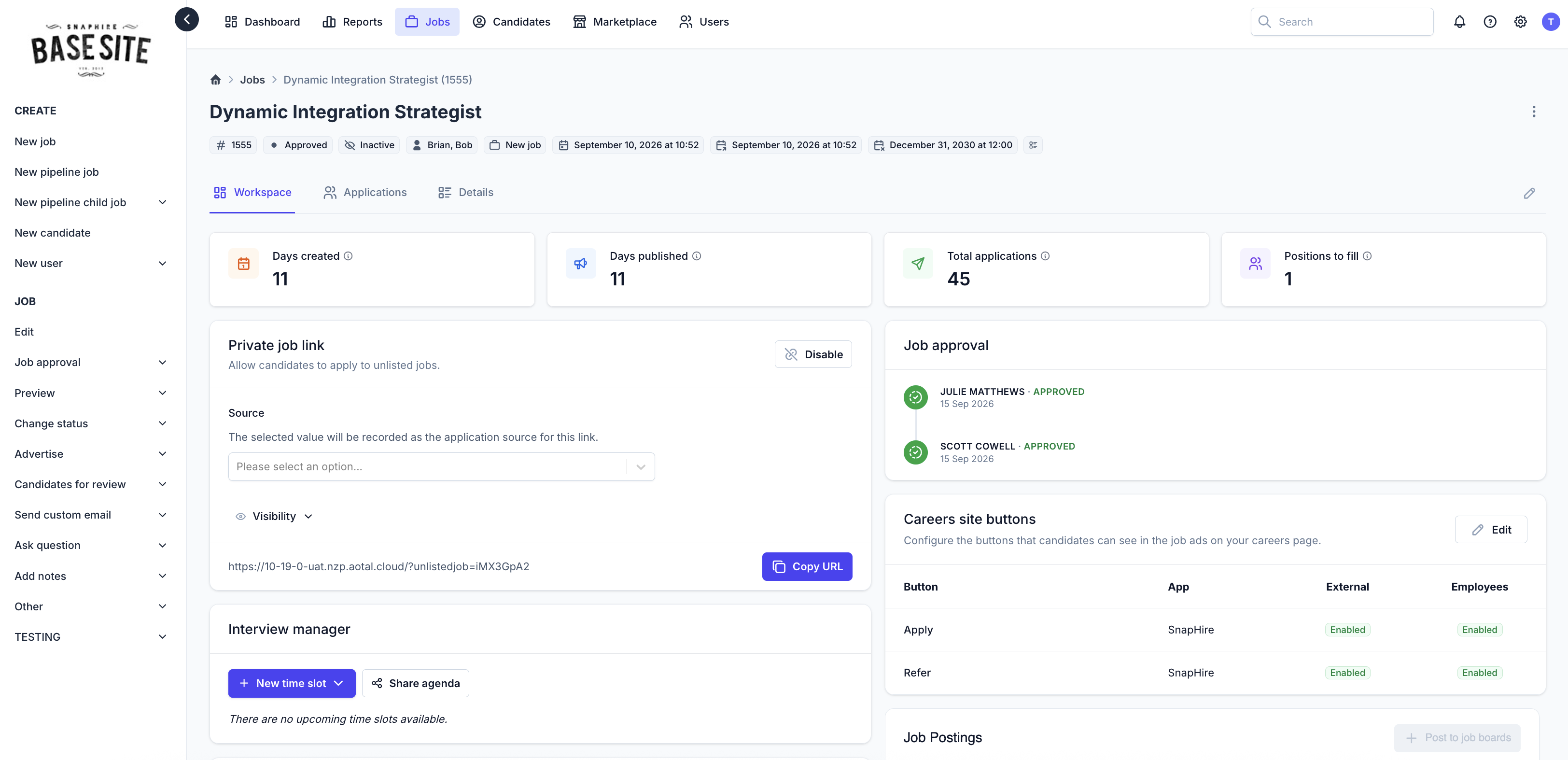
Use the "Enable new version" toggle in the banner to try it out.

Jobs list and Hiring stage screens now default
The Jobs list and Hiring stage screens will now default to the new versions. Users can still switch back to the legacy page for their current session for a limited time.
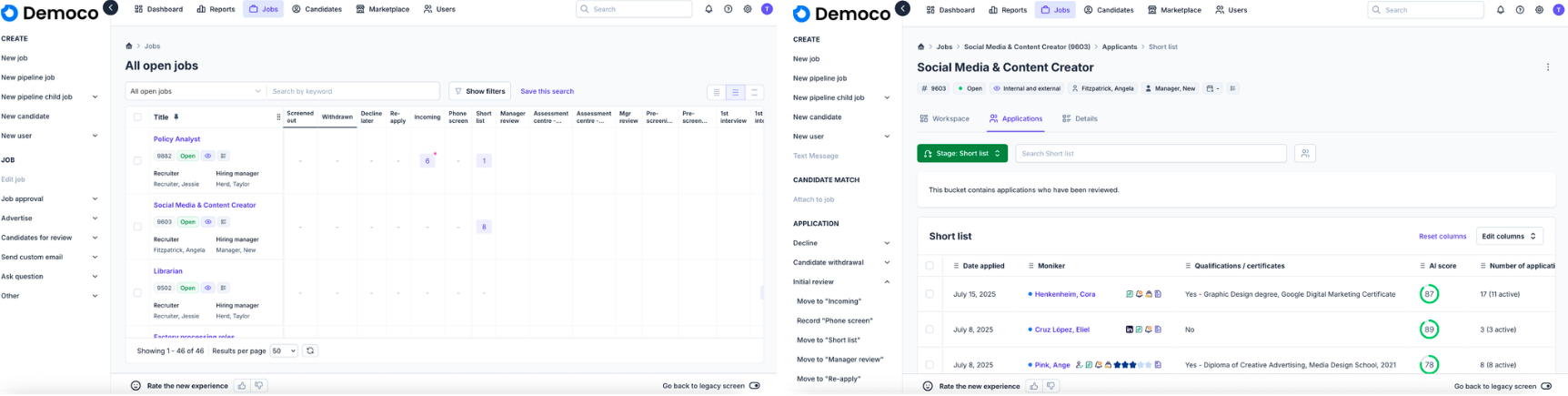
Candidates list
The option to revert to legacy view is no longer available.
Delete candidate update
The delete candidate functionality now opens in a drawer when initiated from v10 screens, such as the Candidates tab.
Scheduled actions admin page improvements
Improved the Scheduled actions admin page with visual updates for improved readability and navigation, along with additional functionality to support upcoming scheduling features.
Updated scheduled action messaging
Updated the scheduling action modal wording to better reflect the process. The modal also includes a link to the updated Scheduled actions admin page to track progress.
Support widget relocation
The Support widget is now available exclusively from the Support tab for users with the "Log ticket to SnapHire Client Portal from within SnapHire" permission. This prevents the widget from interfering with UI elements on certain pages.
Quickview action dropdown rename
Renamed the quickview action dropdown from "More actions" to "Actions" and added a custom icon.
Improved candidate sourcing validation
Improved validation messaging when manually creating a candidate to provide clearer information about missing sourcing details.
Bug Fixes
Manage duplicates page redirection
Fixed an issue that incorrectly redirected users to the legacy Manage duplicates page, limiting functionality available in the new version.
Hiring stage tag column sorting
Removed sorting options for Private tags and Team tags columns in Hiring stage. Sorting on these columns is not currently supported and previously caused an error.
Pipeline job action refresh
Fixed a visual issue that occurred when refreshing the page after raising an action on multiple candidates on a pipeline job.
Manage quick actions permission error
Fixed an issue preventing some users from saving new rules in the Manage quick actions admin screen due to an incorrect permission reference.
SAML metadata download link
Fixed the broken metadata download link in the "Sign in with SAML 2.0" Marketplace app.
Interview manager date and time sorting
Fixed an error when sorting by the Interview manager date and time column. The column now sorts correctly.
Hiring stage visibility
Fixed an issue where Hiring stage visibility settings were not correctly applied in certain configurations on the new screens.
Jobs list category filters
Excluded categories configured as "Job seeker additional information" from Jobs list filters, as these categories are not relevant to jobs.
Quick action visibility
Quick action thumbs up and thumbs down buttons are now hidden for users without permission to raise the corresponding action, preventing errors when attempting to use them.
Multi-choice application question sorting
Fixed an issue preventing sorting on application questions configured as "Multi-choice (multiple selection)" in the new Hiring stage.
Application history action name
Added the action name to the details view when drilling down into an application history item in the quick view drawer.
Child job application field data
Fixed an issue where the quickview did not display all Hiring stage field information for child job applications. The required field answers are now correctly retrieved and displayed.